
How to Onboard With Digital Servay: Step-by-Step SEO Portal Registration Guide
To register and onboard your website with the Digital Servay SEO Client Portal, follow a transparent 3-step setup: (1) Create Workspace by entering your company name, WhatsApp number, website domain, and industry; (2) Select Growth Scope by choosing a fixed monthly retainer tier (Starter, Premium, Enterprise, or Custom Scope); and (3) Verify Milestone Deposit by submitting a 50% advance via bank transfer (Meezan Bank IBFT / Raast). Your project manager activates your live dashboard tracking within 2 to 4 hours.
Dashboard Access Includes: Real-time ranking trackers, Google Search Console sync, backlink audit records, weekly live logs, and direct operational ticketing.
Transparency is the single most critical factor when hiring a search engine optimization agency. Most business owners in Pakistan and overseas are tired of vague monthly PDF reports sent via email that hide where their budget went or what backlinks were built.
To solve this, Digital Servay operates a proprietary, centralized Client Management & SEO Reporting Portal. Whether you are managing an e-commerce catalog, a real estate agency, or a B2B export brand, our portal lets you inspect daily organic movement, verify published backlinks, check on-page changes, and track your deliverables in real time. Below is your complete onboarding walkthrough.
Step 0: Access the Digital Servay SEO Portal
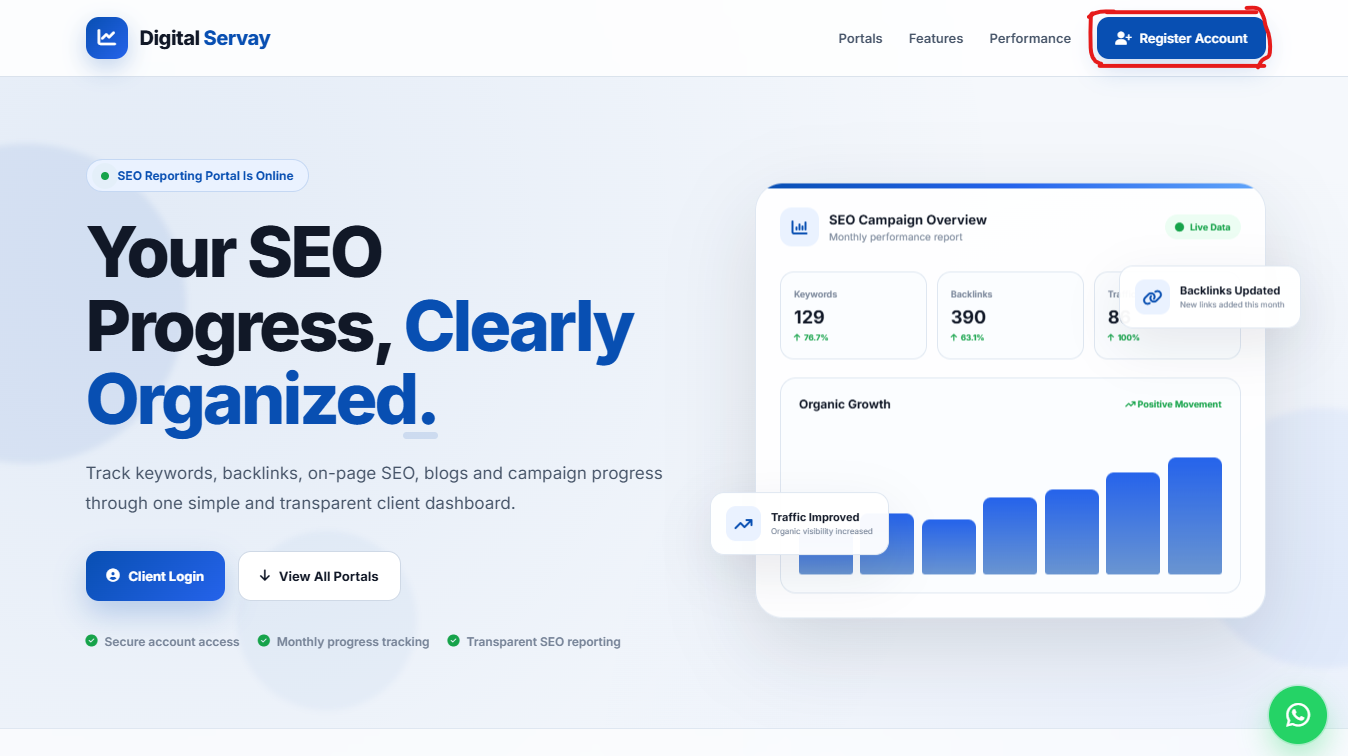
Begin by opening the main portal access page. From our official header, click the highlighted blue "Register Account" button in the top-right corner to initiate your project workspace.
Step 1: Create Your Business Workspace
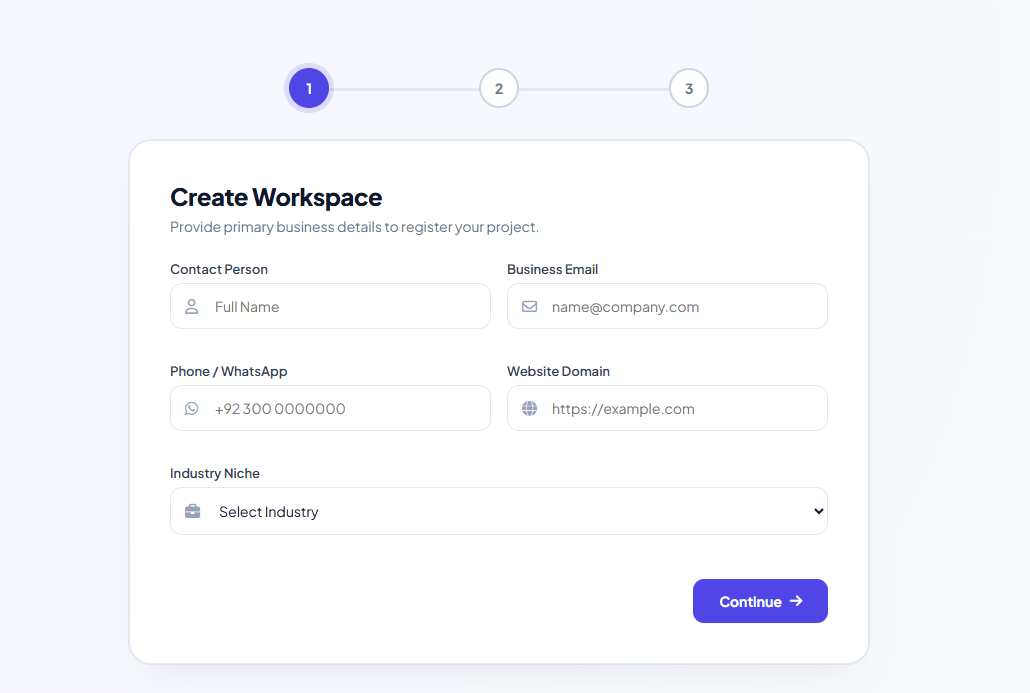
Phase 1: Workspace RegistrationOnce you click into the registration funnel, you will see the Create Workspace setup screen. This initializes your brand’s dedicated environment inside our operational engine:
- Contact Person: Enter your full name or the direct marketing manager responsible for your company.
- Business Email: Your active corporate email where daily automated ranking reports and weekly milestone approvals will be delivered.
- Phone / WhatsApp: Provide your active WhatsApp number (+92 3XX XXXXXXX). Our senior campaign lead connects via direct WhatsApp channel for urgent updates.
- Website Domain: Your exact URL (e.g.,
https://yourdomain.com) which our crawlers will ingest for indexing diagnostics. - Industry Niche: Select your specific business vertical (Real Estate, Fashion E-Commerce, Solar & Energy, B2B Industrial, Tech, Healthcare) so our strategists assign the right niche-experienced SEO specialist.
Step 2: Choose Your Monthly Growth Scope & Budget
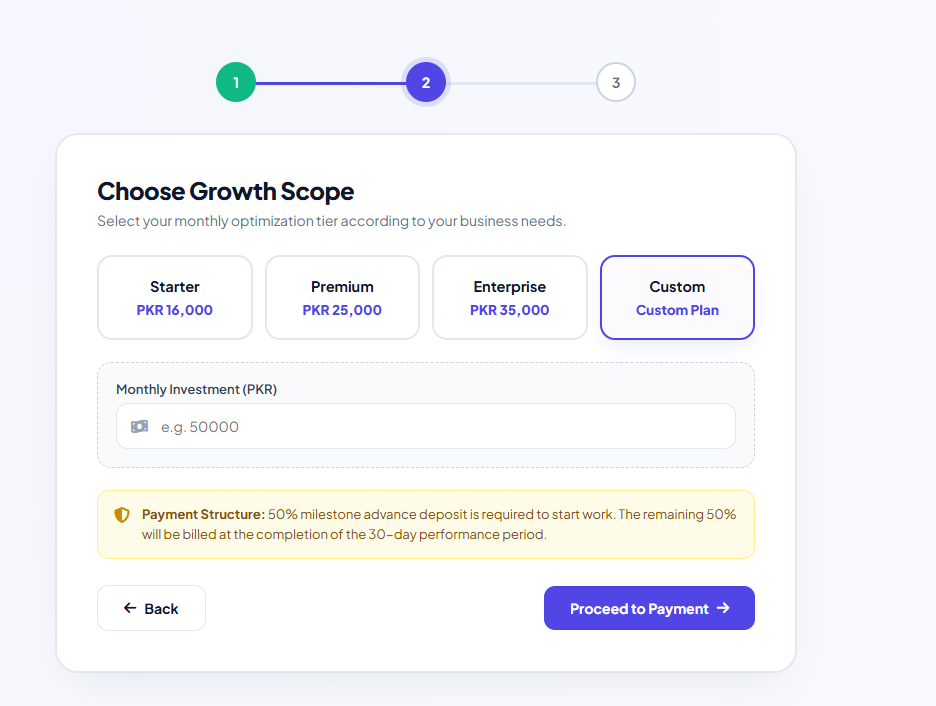
Phase 2: Optimization Tier SelectionSelect the optimization tier that fits your growth targets. We keep our pricing model transparent with zero hidden fees:
- Starter Tier (PKR 16,000 / month): Perfect for local service providers, single-city clinics, or small blogs looking to rank for targeted local search queries.
- Premium Tier (PKR 25,000 / month): Designed for growing brands requiring competitive keyword expansion, technical schema fixes, and monthly authoritative link acquisition.
- Enterprise Tier (PKR 35,000 / month): Full-scale national dominance for competitive commercial queries across Pakistan (e.g., nationwide manufacturing, nationwide fashion).
- Custom Growth Scope: Tailor your monthly retainer if you are running multi-language platforms, programmatic directories, or international export campaigns across the US, UK, or UAE.
Note on Payment Structure: To safeguard both parties, Digital Servay operates on a 50% milestone advance deposit to initiate technical audits and keyword mapping. The remaining 50% balance is billed at the end of the 30-day performance period.
Step 3: Verify Your Milestone Deposit (IBFT / Raast)
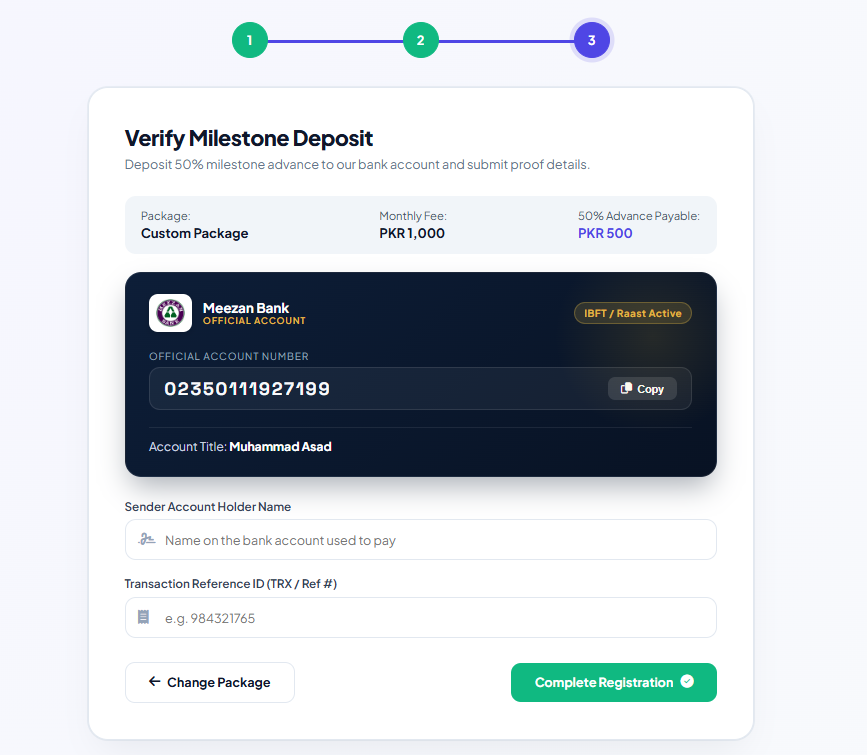
Phase 3: Secure Advance VerificationAfter confirming your tier, proceed to the secure transaction verification screen. Digital Servay utilizes verified corporate banking channels to ensure immediate reconciliation:
- Bank Details: Official Meezan Bank account with active IBFT and instant Raast integration.
- Account Title: Official agency verification under registered leadership.
- Submit Proof Details: After initiating your transfer from your banking app (Meezan, HBL, Alfalah, Nayapay, Sadapay, or Easypaisa/Jazzcash), input your Sender Account Holder Name and the Bank Transaction Reference ID (TRX / Ref #).
- Click the green "Complete Registration" button to lock in your submission.
Step 4: Instant Confirmation & Campaign Kickoff
Once submitted, you will receive the "Milestone Deposit Submitted!" confirmation status screen. Here is what happens over the next 2 to 24 hours as your campaign initiates:
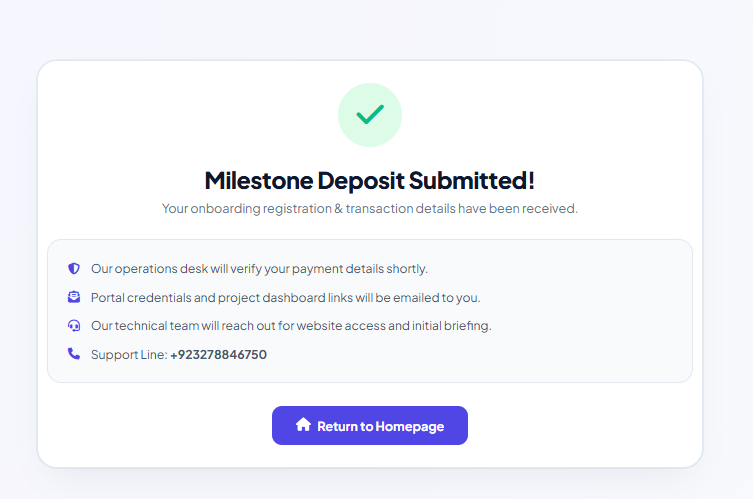
- Operations Desk Verification: Our finance team confirms the transaction reference and reconciles your project invoice.
- Portal Credentials Dispatched: Your private username and login link are generated and sent to your registered business email.
- Technical Onboarding Call: Your dedicated account lead reaches out on WhatsApp (+92 327 8846750) to collect Google Search Console (GSC) and Google Analytics (GA4) access.
- Baseline Roadmap Launch: We configure live rank tracking for your target keyword clusters and run our comprehensive 15-point site latency and crawl audit.
Ready to Experience 100% Transparent SEO Growth?
Stop settling for blind retainers. Track every click, every backlink, and every rupee of your marketing ROI through Digital Servay’s dedicated client dashboard.
Frequently Asked Questions About the Client Portal
Common questions our partners ask when registering their projects:
Your workspace is generated immediately upon registration. Once our operations desk verifies the 50% milestone transaction reference (typically within 1 to 3 business hours), your full dashboard credentials and access permissions are emailed to you.
Yes. After your workspace is provisioned, you can invite sub-users (such as your CTO, marketing managers, or founders) with view-only or full administrative management privileges.
You can track daily SERP rank positions on Google Pakistan and international markets, newly acquired live backlinks with domain authority metrics, technical on-page fixes, published blog posts, and active support tickets raised with your project manager.
Yes. While domestic clients use Meezan Bank IBFT or Raast, international clients across the US, UK, Canada, and GCC regions can pay via direct Wise transfer, international Wire, or Payoneer. Contact our WhatsApp support at +92 327 8846750 for international payment scopes.